API Workflow: How to dynamically create an Inventory Item and add stock via API?

Use Case Summary:
We are building an automated warehouse tracking system. The system scans products using an RFID reader, and streams the scanned tags to our local, self-hosted OpenBoxes instance (v0.9.8) via external Python scripts.

The Structural Problem:
We can create the base Product card template in the system. However, when the drone scans a product, it is a brand-new asset that has no existing lot number, tracking history, or row in the inventory_item database table.

When we try to use endpoints like /api/generic/transaction or /api/stockAdjustments to add a quantity of 1, the API returns a network success code, but the transaction is quietly rolled back on the backend because no matching inventoryItem tracking record exists to hold it.

Our Quick Questions:

  1. What is the correct API endpoint sequence to handle a completely fresh asset addition? Do we need to call an endpoint to explicitly create an inventoryItem (lot row) before posting a transaction quantity?

  2. Could you share a valid JSON payload example for a direct stock adjustment on a product that does not have a pre-existing lot code?

Best regards,

Mustafa

Hey Mustafa

Hello — I joined OpenBoxes last week but haven’t seen an approval yet. I understand new members may need a couple of days to be admitted, but I’m wondering when I’ll be approved so I can post questions. I’m currently blocked by an API issue and would appreciate access soon.

First of all apologies for the delay with your account setup. I’m not sure what would have caused that. But it seems like it’s working now, so welcome!

What is the correct API endpoint sequence to handle a completely fresh asset addition? Do we need to call an endpoint to explicitly create an inventoryItem (lot row) before posting a transaction quantity?

Yes, in OpenBoxes, every stock transaction entry points at an InventoryItem, not a Product directly. The InventoryItem is the (product + lotNumber/serialNumber + expirationDate) tuple. If you POST a transaction without a matching inventoryItem.id, the entry fails validation and the transaction gets rolled back. And yes, unfortunately the API isn’t always loud about that.

Aside: One thing to note is that InventoryItem is a bit confusing in OpenBoxes. It is what virtually every other WMS would call a Product Lot or Batch. Again, it’s the (Product + Lot Number + Expiration Date) tuple. It’s the definition of a stockable inventory item, but not an actual instance of stock. The misleading part is that the name implies a physical unit of lot-controlled or serialized stock at a location with quantity within a facility. However, in OpenBoxes the InventoryItem has no quantity or location. Hopefully that makes sense. If not, I can try to provide an example.

So for your workflow, the sequence is:

1. Find or create the InventoryItem first. You can use the generic API to create one.

POST /openboxes/api/generic/inventoryItem
Content-Type: application/json

{
  "product": { "id": "<productId>" },
  "lotNumber": "<RFID-tag-or-generated-lot>",
  "expirationDate": "01/01/2030"
}

If the product isn’t lot-tracked, you can pass "lotNumber": null and OpenBoxes will resolve to (or create) the default inventory item for that product. If you GET /api/generic/inventoryItem?product.id=<productId>&lotNumber=<lotNumber> first, you can decide whether to create or reuse.

There should be a default inventory item associated with each product, so you can also try to retrieve the inventory items associated with a given product. But I need to play around with the API to remind myself how to do that.

2. Then POST a transaction against that inventoryItem.id. Something like this should wor.

POST /openboxes/api/generic/transaction
Content-Type: application/json

{
  "transactionType": { "id": "9" },           // PRODUCT_INVENTORY
  "transactionDate": "06/23/2026 12:00",
  "inventory": { "id": "<inventoryId-for-the-facility>" },
  "transactionNumber": "RFID-<uid>",
  "transactionEntries": [
    {
      "inventoryItem": { "id": "<inventoryItemId>" },
      "binLocation": { "id": "<binLocationId>" }   // optional
      "quantity": 1,
    }
  ]
}

Could you share a valid JSON payload example for a direct stock adjustment on a product that does not have a pre-existing lot code?

I’ll put together a few concrete examples for you tomorrow.

Justin

Hello @jmiranda

First of all apologies for the delay with your account setup. I’m not sure what would have caused that. But it seems like it’s working now, so welcome!

It is no problem. Thank you. It gave me chance to read the API documentation and look at some examples.

I did create a new product. Please see below the output from products API

{
    "data": [
        {
            "id": "ff8081819ee76ce4019eef69326b001a",
            "productCode": "RFID-TAG-TEST-001",
            "name": "Quadcopter Show Stock Asset",
            "description": "",
            "category": "IT Equipment",
            "unitOfMeasure": "",
            "pricePerUnit": null,
            "dateCreated": "2026-06-22T12:58:29Z",
            "lastUpdated": "2026-06-22T12:58:29Z",
            "updatedBy": "Miss Administrator",
            "color": null,
            "handlingIcons": [],
            "lotAndExpiryControl": false,
            "active": true,
            "displayNames": {
                "default": null
            }
        }
    ],
    "totalCount": 1
}

I got into stockMovements because I wasn’t able to get inventoryItem working. Here is what I ended up last night. :slight_smile:

# =====================================================================
# 2. OPENBOXES CORE SESSION HANDSHAKE INITIALIZATION
# =====================================================================
def authenticate_session():
    print(f"[Auth Engine] Attempting login to OpenBoxes container at: {LOGIN_URL}")
    login_payload = {
        "username": "admin",
        "password": "password",
        "location": "1"  # Main Warehouse location entry number
    }
    headers = {"Content-Type": "application/json", "Accept": "application/json"}
    
    try:
        response = session.post(LOGIN_URL, json=login_payload, headers=headers, timeout=10)
        
        if "authentication was successful" in response.text.lower() or response.status_code in [200, 201, 204]:
            print("[Auth Engine] Session initialized! Cookies saved to thread container state.")
            return True
        else:
            print(f"[Auth Error] Server rejected session mapping credentials. Response: {response.text}")
            return False
    except Exception as e:
        print(f"[Auth Connection Error] Failed to reach login API gateway: {e}")
        return False

# =====================================================================
# 3. TWO-STAGE PRODUCT LEDGER SYNCHRONIZATION TRANSACTION PIPELINE
# =====================================================================
def forward_to_openboxes(scan_data):
    try:
        headers = {"Accept": "application/json", "Content-Type": "application/json"}

         # -------------------------------------------------------------
        # STAGE 1: Initialize the Stock Movement Form Header Instance
        # 
        # Convert your mock timestamp "2026-06-21 22:00:00" into valid Grails ISO-8601 "2026-06-21T22:00:00Z"
        raw_timestamp = scan_data.get("timestamp", time.strftime("%Y-%m-%d %H:%M:%S"))
        formatted_date = raw_timestamp.replace(" ", "T") + "Z"

        header_payload = {
            "name": f"Drone RFID Scan Transfer {scan_data['tag_id']}",
            "description": "Automated drone scan sync from AWS IoT Core",
            "origin": {
                "id": "2"
            },        
            "destination": {
                "id": "1"
            },   # Main Supplier ID (Different node clears custom validation)
            "requestedBy": {
                "id": "1"
            },   # Admin User ID
            "dateRequested": formatted_date
        }

        init_res = session.post(STOCK_MOVEMENT_URL, headers=headers, json=header_payload, timeout=5)

        # Intercept dropped or expired session states cleanly
        if init_res.status_code == 401 or "login" in init_res.url:
            print("[Auth Expired] Session token dropped. Re-running handshake...")
            if authenticate_session():
                init_res = session.post(STOCK_MOVEMENT_URL, headers=headers, json=header_payload, timeout=5)
            else:
                return False


        if init_res.status_code not in [200, 201, 204]:
            print(f"[API Stage 1 Error] Init failed. Status: {init_res.status_code}, Msg: {init_res.text}")
            return False
            
        # Extract the newly created unique database hash string token
        # Extract the newly created unique database hash string token from OpenBoxes response body data block
        res_json = init_res.json()
        movement_id = res_json.get("data", {}).get("id") if "data" in res_json else res_json.get("id")

        if not movement_id:
            print(f"[API Stage 1 Error] Failed to parse transaction registry token from response: {init_res.text}")
            return False

        # -------------------------------------------------------------
        # STAGE 2: Bind the Drone Scanned Product Metric Arrays to the Open Sheet
        # -------------------------------------------------------------
        update_url = f"{STOCK_MOVEMENT_URL}/{movement_id}"
        item_payload = {
            "id": movement_id,
            "lineItems": [
                {
                    "product.id": "ff8081819ee76ce4019eef69326b001a",  # Your verified product ID hash
                    "quantityRequested": "1"  # Set increment target value
                }
            ]
        }
        
        commit_res = session.post(update_url, headers=headers, json=item_payload, timeout=5)
        
        if commit_res.status_code in [200, 201, 204] and "error" not in commit_res.text.lower():
            print(f"[API Sync] Successfully posted stock adjustment for Tag: {scan_data['tag_id']}")
            return True
        else:
            print(f"[API Stage 2 Error] OpenBoxes rejected transaction commit items. Response: {commit_res.text}")
            return False
            
    except Exception as e:
        print(f"[Network Error] Failed to complete application transaction routing pass: {e}")
        return False

Thanks for your help.
Mustafa

Awesome. Glad you got it working.

For what it’s worth, the Stock Movements API is a bit more than you need. In fact, it requires more work to receive and ship the stock movement. The stock movement API is a coarse-grained API that models a multi-step “shipment” (outbound for transfers out or inbound for receipts). Inventory levels (quantity on hand) will only change on the issuance or receiving state transitions.

You said

However, when the drone scans a product, it is a brand-new asset that has no existing lot number, tracking history, or row in the inventory_item database table.

That means there’s no existing lot/serial number in the database, but that doesn’t mean there’s no serial number available, correct? In other words, I assume the RFID tag data encodes the product and lot/serial. Or does the link need to come from a different database?

As you mentioned in the previous message, you’re just trying to register an asset. This could be done by creating an adjustment (or recording a baseline inventory). I’ll work on some examples later today.

However, in order to provide the right solution here, it would be helpful if I had a better understanding of your use case. So if you have time would you mind responding to these questions:

  1. How are you resolving the RFID tag to a product?
  2. What does the RFID data look like?
  3. How do you know the item is a new asset? If the drone is flying around the facility, won’t it register the same RFID signals over and over again?
  4. What is the drone’s responsibility? Is it flying around the facility, taking an inventory? Or is it stationary at a point of ingress?
  5. Are the products serialized assets? Do they have serial numbers? Or do you need to assign them at some point?
  6. How does the stock get into the facility in the first place? Is there a receiving process taking place?

Justin

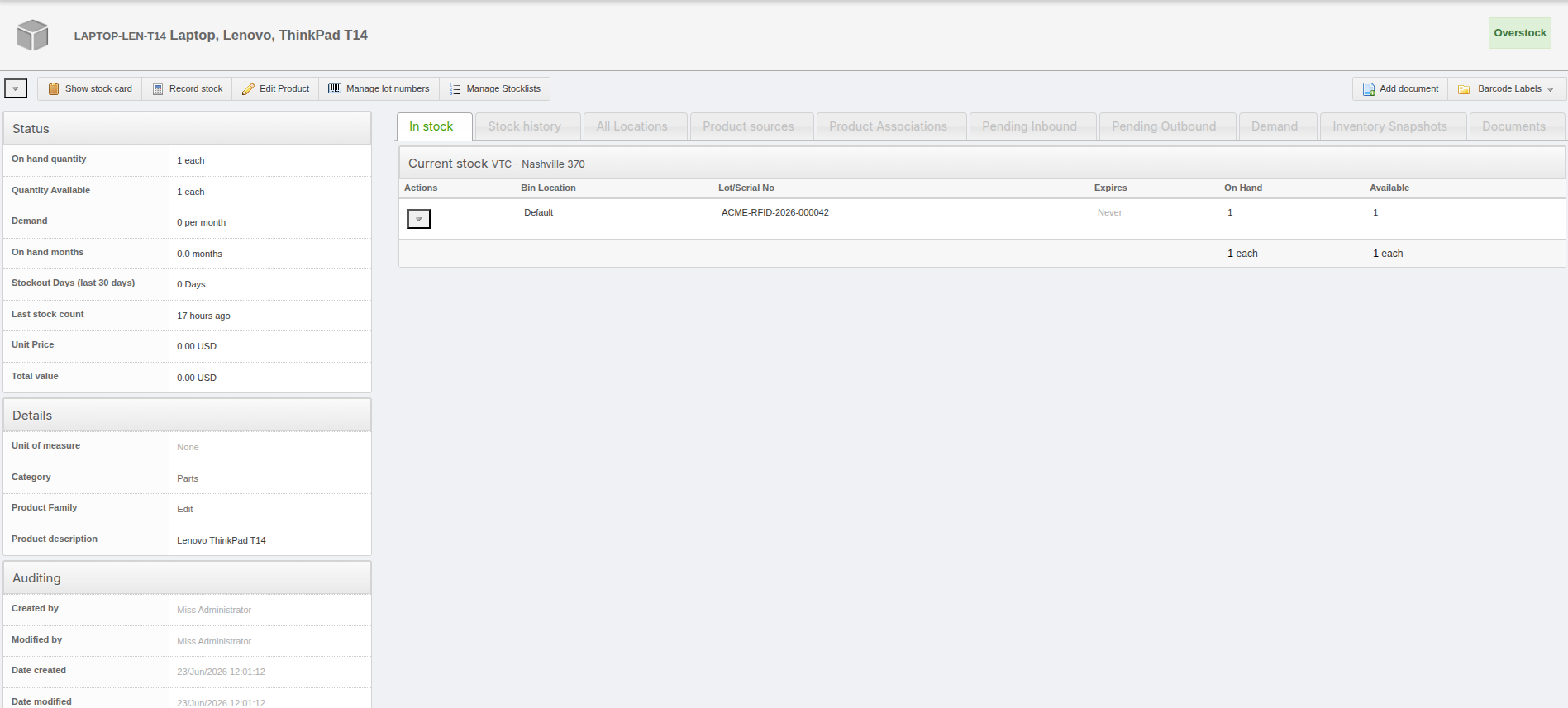
Here’s a quick example of how I would record stock for a new inventory item in OpenBoxes.

Start by creating a new product, if necessary. Otherwise, you’ll need to look up the product in some way. This is where I need a bit more context to figure out the best way to guide you.

Request

POST /openboxes/api/generic/product HTTP/1.1
Host: myhost.openboxes.com
Accept: application/json
Content-Type: application/json
Authorization: ••••••
Cookie: JSESSIONID=<JSESSIONID>
Content-Length: 235

{
    "productCode": "LAPTOP-LEN-T14",
    "name": "Laptop, Lenovo, ThinkPad T14",
    "description": "Lenovo ThinkPad T14",
    "category": "ff808181963b09bf0196404896350002",
    "productType": "DEFAULT",
    "disableRefresh": true
}

Response

{
    "data": {
        "id": "8a8f80869ef54e9e019ef56dc2580021",
        "productCode": "LAPTOP-LEN-T14",
        "name": "Laptop, Lenovo, ThinkPad T14",
        "description": "Lenovo ThinkPad T14",
        "category": "Parts",
        "unitOfMeasure": null,
        "pricePerUnit": null,
        "dateCreated": "2026-06-23T17:01:11.641Z",
        "lastUpdated": "2026-06-23T17:01:11.641Z",
        "updatedBy": "Miss Administrator",
        "color": null,
        "handlingIcons": [],
        "lotAndExpiryControl": false,
        "active": true,
        "upc": null,
        "displayNames": {
            "default": null
        }
    }
}

Then you need to create the default product lot (inventory item) for the given product.

Request

POST /openboxes/api/generic/inventoryItem HTTP/1.1
Host: myhost.openboxes.com
Accept: application/json
Content-Type: application/json
Authorization: ••••••
Cookie: JSESSIONID=<JSESSIONID>
Content-Length: 104

{
    "product": "8a8f80869ef54e9e019ef56dc2580021",
    "lotNumber": null,
    "expirationDate": null
}

Response

{
    "data": {
        "id": "8a8f80869ef54e9e019ef5638a350020",
        "product": {
            "id": "8a8f80869ef54e9e019ef561a013001f",
            "name": "pixel, haptic, killer",
            "productCode": "SSL-k69",
            "upc": null
        },
        "lotNumber": null,
        "expirationDate": null
    }
}

Or you can register a serial number for the given product. Again, I’m not exactly sure how the RFID tag should resolve to a product. If the product is already known and the RFID is just an asset tag, then it can be used here to register a serial number for that product.

Request

POST /openboxes/api/generic/inventoryItem HTTP/1.1
Host: myhost.openboxes.com
Accept: application/json
Content-Type: application/json
Authorization: ••••••
Cookie: JSESSIONID=<JSESSIONID>
Content-Length: 104

{
    "product": "8a8f80869ef54e9e019ef56dc2580021",
    "lotNumber": "ACME-RFID-2026-000042",
    "expirationDate": null
}

Response

{
    "data": {
        "id": "8a8f80869ef5739d019ef5787b2a0000",
        "product": {
            "id": "8a8f80869ef54e9e019ef56dc2580021",
            "name": "Laptop, Lenovo, ThinkPad T14",
            "productCode": "LAPTOP-LEN-T14",
            "upc": null
        },
        "lotNumber": "ACME-RFID-2026-000042",
        "expirationDate": null
    }
}

Then we just need to combine this

Request

POST /openboxes/api/generic/transaction HTTP/1.1
Host: myhost.openboxes.com
Accept: application/json
Content-Type: application/json
Authorization: ••••••
Cookie: JSESSIONID=<JSESSIONID>
Content-Length: 301

{
  "transactionType": { "id": "12" },
  "transactionDate": "06/23/2026 12:00",
  "inventory": { "id": "1" },
  "comment": "Opening balance for RFID-tracked inventory",
  "transactionEntries": [
    {
      "inventoryItem": { "id": "8a8f80869ef5739d019ef5787b2a0000" },
      "quantity": 1
    }
  ]
}

Response

{
    "data": {
        "id": "8a8f80869ef5739d019ef57cbd640006",
        "dateCreated": "2026-06-23T17:17:33Z",
        "transactionNumber": null,
        "lastUpdated": "2026-06-23T17:17:33Z",
        "incomingShipment": null,
        "updatedBy": {
            "id": "1"
        },
        "order": null,
        "receipt": null,
        "transactionEntries": [
            {
                "id": "8a8f80869ef5739d019ef57cbd640007"
            }
        ],
        "dateConfirmed": null,
        "confirmedBy": null,
        "transactionSource": null,
        "outgoingShipment": null,
        "source": null,
        "requisition": null,
        "transactionDate": "2026-06-23T00:00:00Z",
        "comment": "Opening balance for RFID-tracked inventory",
        "transactionType": {
            "id": "12"
        },
        "inventory": {
            "id": "1"
        },
        "destination": null,
        "createdBy": {
            "id": "1"
        },
        "cycleCount": null,
        "confirmed": false
    }
}

And here’s a screenshot showing the stock card for the given product

Hi @jmiranda

Would you be able to join a conference call with me and my team? It would be easier to discuss and answer your questions so that we are heading into right directions. I am based in EST. We are free most mornings.

Thank you,
Mustafa

Yes, of course. That sounds great.

You can schedule a call using the following link. Looks like I have some “morning” availability on Friday.

Thank you!!!

Mustafa